Bluetooth Low Energy has come a long way from its early days as a low data rate technology. With Bluetooth 5, the addition of the 2M PHY and larger packet sizes made it possible to move a lot more data over the air.
Newer updates in Bluetooth 6 continue to improve timing and efficiency, pushing performance even further. BLE is no longer just for simple sensors. It’s a solid option for things like firmware updates, data logging, and streaming.
But getting this kind of performance which we’ve been asked to provide on many projects takes a lot of work.
In this guide, we will walk through how data moves across a BLE connection and show you how to understand why factors are involved and how to get the highest speed possible using the latest specification.
We’ll take a deep dive into how BLE actually works and what affects its speed, so you can get the most out of it, including:
- What factors affect BLE Throughput throughput and how to configur them?
- How to design the application to maximize speed
- What BLE throughput can one expect in practice
- How do we actually measure the throughput
- What features in Bluetooth 5 and Bluetooth 6 can I use to increase throughput
- What tradeoffs when we increase throughput
Understanding the Basics of Bluetooth LE Throughput
By default BLE has a 1Mbps over-the-air data rate, but in practice, you won’t achieve close to this limit. Even though BLE supports higher data rates like the 2 Mbps mode introduced in Bluetooth 5, the PHY alone doesn’t determine your real-world throughput.
Getting the most out of the radio depends on the overall system and how you tune a range of other parameters and system-level settings. In practice, only some of these parameters are directly under your control.
The most important factors that affect BLE throughput are:
- LE PHY Selection (1M LE PHY vs 2M LE PHY)
- Enabling Data Length Extension (DLE)
- Connection interval
- Packets per Connection Event
- Inter Frame Space (IFS)
- Stack + controller Scheduling Behavior
- L2CAP MTU
- ATT MTU
- GATT Operation type (Write vs Notification)
- Interference
All of these factors come together and determine the actual speed. We’ll be covering these from the bottom up, starting with the PHY and moving up to the application
LE PHY Selection
The maximum throughput is set by the radio’s PHY, since it defines how fast data is modulated and transmitted over the air. By default all Bluetooth LE radios use the 1Mbps LE PHY called 1M LE PHY. The Bluetooth 5 specification added support for the 2M LE PHY which as you can guess sends data twice as fast.
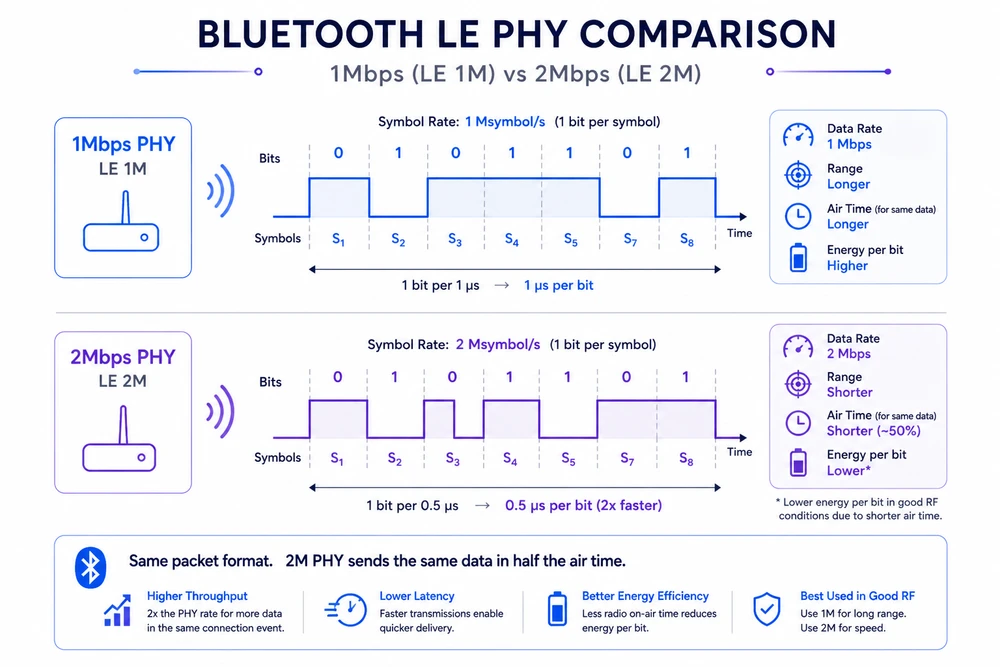
Using the 2M LE PHY cuts down the time to send the same packet by half. This allows for more packets to fit in the same amount of time, increasing the throughput significantly.
However, using the 2M LE PHY isn’t automatic. Because it’s an optional feature (meaning, LE Radios are required to support it), BLE devices will always advertise and connect over the 1Mbps LE PHY. Then, both devices need to switch over to use the 2Mbps LE PHY during the connection if both radios support it.
Changing to the 2M LE PHY requires both devices to do the PHY Update Procedure in which they exchange their PHY capabilities.
In practice, this procedure acts more like a suggestion than a negotiation. Either device can initiate it, but it’s the Central that decides which PHY is used in each direction, usually based on the capabilities supported by both devices.
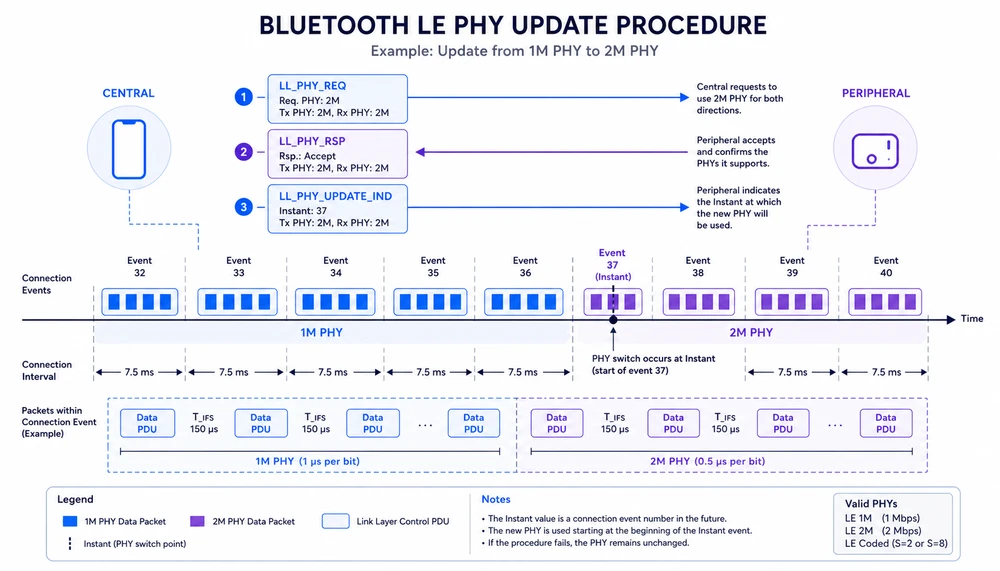
When you’re working with Mobile phones like iPhones and Android, those devices almost always support 2M LE PHY. The good news is that they will also prefer to switch to this PHY because it improves performance overall. So for the most part you should have no issue.
A product that wants to maximize throughput just needs to declare that they want to use the 2Mbps PHY and the stack will use the PHY Update procedure.
Let’s look at how we can tell a Zephyr device to request 2Mbps PHY. To do this we will call the bt_conn_le_phy_update API. request_2m_phy should be called in the connection callback in order to make the switch as quickly as possible.
#include <zephyr/bluetooth/conn.h>

static void request_2m_phy(struct bt_conn *conn)
{
    int err;

    err = bt_conn_le_phy_update(conn, BT_CONN_LE_PHY_PARAM_2M);
    if (err) {
        printk("PHY update failed: %d\n", err);
    }
}
If you are still using the older nRF5 SDK, there’s a similar process
static void request_2m_phy(uint16_t conn_handle)
{
    ret_code_t err_code;

    ble_gap_phys_t phys;
    phys.tx_phys = BLE_GAP_PHY_2MBPS;
    phys.rx_phys = BLE_GAP_PHY_2MBPS;

    err_code = sd_ble_gap_phy_update(conn_handle, &phys);
    APP_ERROR_CHECK(err_code);
}

static void ble_evt_handler(ble_evt_t const * p_ble_evt, void * p_context)
{
    switch (p_ble_evt->header.evt_id)
    {
        case BLE_GAP_EVT_CONNECTED:
        {
            uint16_t conn_handle = p_ble_evt->evt.gap_evt.conn_handle;
            request_2m_phy(conn_handle);
        } break;

        case BLE_GAP_EVT_PHY_UPDATE:
        {
            ble_gap_evt_phy_update_t const * p_phy =
                &p_ble_evt->evt.gap_evt.params.phy_update;

            printf("PHY updated: TX=%d RX=%d\n",
                   p_phy->tx_phy,
                   p_phy->rx_phy);
        } break;

        default:
            break;
    }
}
This procedure is not guaranteed, and there are times that a Central radio may decide that it needs to stay in 1M LE mode. For example if it’s scanning heavily, or it determines performance isn’t required.
One other important consideration is that only one control procedure can run at a time. So the PHY update can fail or delay if another procedure is running like:
- Connection parameter update
- Data Length Update (DLE)
- PHY update (already in progress)
- Pairing / encryption
Are there reasons why you wouldn’t want to use 2Mbps PHY?
Yes. The higher modulation requires a better signal level than the 1Mbps PHY, which means that the range when using 2Mbps is shorter than 1Mbps. Just like when someone talks faster you need the room to be more quiet to be able to hear everything.
If range is critical, switching to 2Mbps could cause more packet losses, which can reduce the throughput to the point where it’s not usable. On the other hand shorter packets can experience less interference since the radio is quicker on the air.
This is an important tradeoff to consider, and none of the other changes will have this kind of impact.
Here’s some data about the differences in range between the two modes you can expect.
| Scenario | 1M PHY | 2M PHY |
|---|---|---|
| Indoor office | 30–50 m | 15–30 m |
| Open space LOS | 100–200 m | 70–150 m |
| Noisy RF / multipath | Much more robust | Drops off faster |
LE Packets
Before we talk about DLE and the other features, we need to talk about the actual LE Data Packets are exchanged, because ultimately these are what determines throughput.
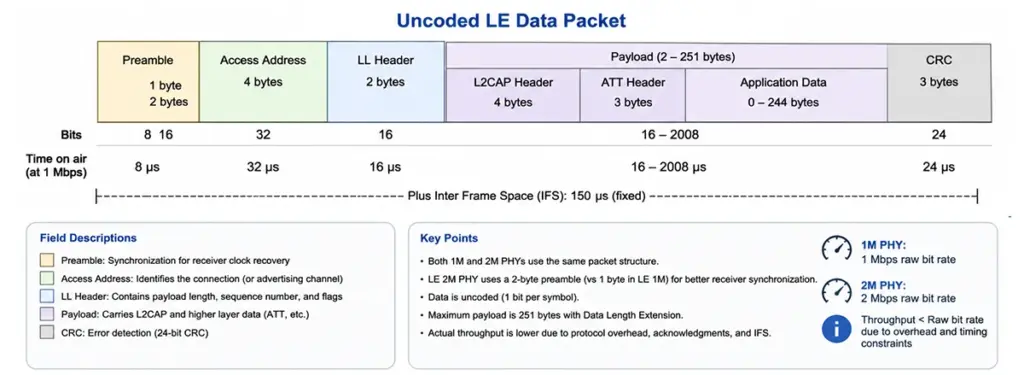
In Bluetooth Low Energy, the uncoded PHYs (LE 1M and LE 2M) use the same basic packet layout, but they send data at different speeds. Both use a simple one-to-one mapping of bits, so there’s no extra coding like you get with the coded PHY.
Every packet follows the same structure: Preamble → Access Address → Link Layer (LL) Header → Payload → CRC as you can see in the packet format image above. The layout itself stays the same between LE 1M and LE 2M. What changes is how long it takes to send each part, and a few small details like the preamble size, which affects overall performance.
The preamble comes first and helps the receiver lock onto the signal. In LE 1M it’s 1 byte, and in LE 2M it’s 2 bytes. The longer Preamble at the higher speed gives the receiver the same amount of time to syncronize correctly.
After that comes the Access Address, which is 4 bytes and acts like an identifier for the connection. It lets the receiver quickly decide if the packet is meant for it. Then comes the Link Layer header, usually 2 bytes, which carries things like payload length, sequence numbers, and flags used for acknowledgments and retries.
The payload is where your actual data goes, but it also includes some extra headers from higher layers. Most applications use L2CAP and ATT, so you’ll typically see a 4-byte L2CAP header and a 3-byte ATT header before your data starts.
With Data Length Extension enabled, the payload can be as large as 251 bytes, which gives you up to 244 bytes for application data. You only hit that number if everything is configured correctly though. If your MTU or buffers are smaller, the data gets split across multiple packets, which adds overhead and reduces throughput.
At the end of the packet is the CRC, a 3-byte field used to check for errors. BLE depends on this, along with acknowledgments and retransmissions, to make sure data is delivered correctly. If a packet doesn’t pass the CRC check, it gets dropped and sent again later. This helps reliability, but it also adds extra traffic, especially in noisy environments, which reduces throughput.
Looking at timing, the difference between LE 1M and LE 2M is clear. In LE 1M, each byte takes about 8 microseconds to send. In LE 2M, it only takes about 4 microseconds. So everything gets sent faster, including both data and overhead.
But not everything scales with speed. Fixed gaps like the 150 microsecond Inter Frame Space (IFS) stay the same. Because of that, you don’t get a full 2x increase in real throughput, even though the radio is running twice as fast. However, with Bluetooth 6.0, this spacing is no longer fixed at 150us.
Data Length Extensions
To get maximum speed we need to reduce overhead, which means more payload bytes and less overhead bytes.
The original Bluetooth 4.0 Specification only allowed for a payload of 20 bytes. Bluetooth 4.2 introduced Data Length Extensions (DLE) which allows you to send up to 244 bytes of ATT data. This drastically improves efficiency and allows for much higher throughput.
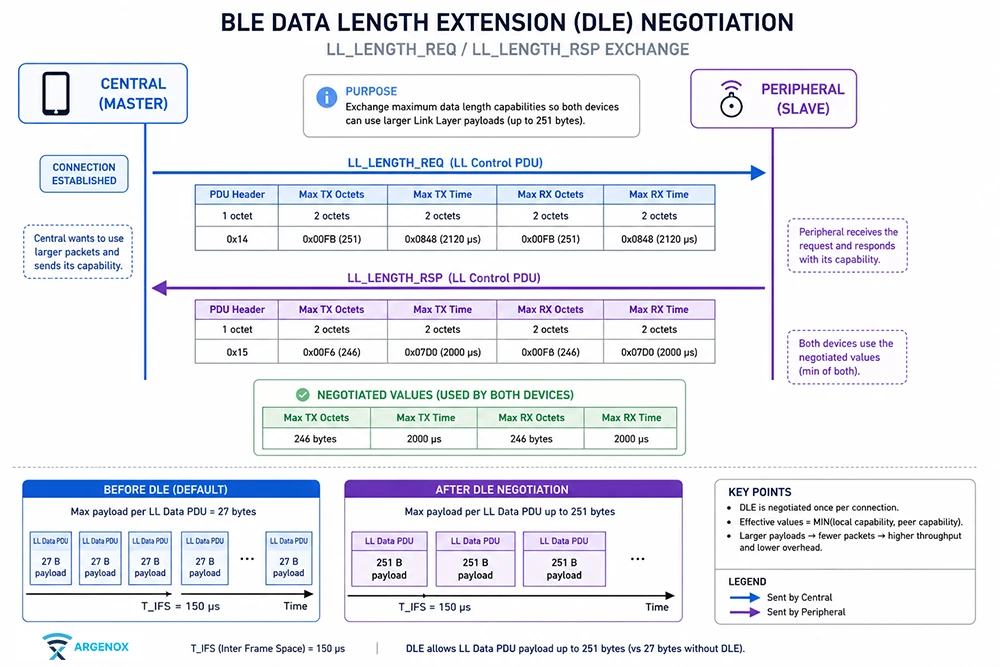
Data Length Extensions is a feature that usually needs to be enabled in the stack of the device you’re using. It’s practically always supported and you can expect iPhone and Android devices to always support it.
For Nordic Zephyr devices you can enable DLE by defining the proper Data Length parameter in the prj.conf file
# Enable Bluetooth
CONFIG_BT=y

# Enable controller data length extension
CONFIG_BT_CTLR_DATA_LENGTH_MAX=251

# Increase ACL buffer sizes (CRITICAL)
CONFIG_BT_BUF_ACL_TX_SIZE=251
CONFIG_BT_BUF_ACL_RX_SIZE=251

# Increase buffer counts (recommended)
CONFIG_BT_BUF_ACL_TX_COUNT=10
CONFIG_BT_BUF_ACL_RX_COUNT=10
Even though DLE is enabled here, it still needs to be called at runtime
struct bt_conn_le_data_len_param param = {
.tx_max_len = 251,
.tx_max_time = 2120, // typical for 251 bytes @ 1M
};
bt_conn_le_data_len_update(conn, ¶m);
You can confirm that DLE is being used by using a sniffer and checking the LL_LENGTH_REQ and LL_LENGTH_RSP packets
Bluetooth LE Connection Intervals and Throughput
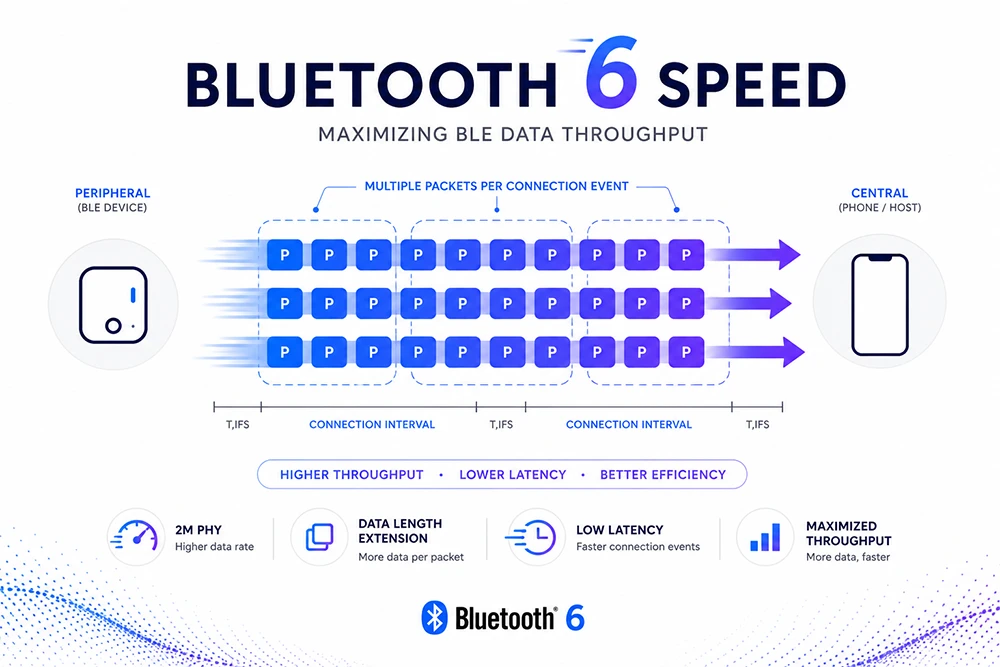
Bluetooth LE devices communicate by sending packets between the Central and peripheral at moments called Connection Events. These Connection Events happen periodically at an interval called the Connection Interval.
If you’ve spent any time looking at maximizing BLE throughput you will have seen that reducing the Connection Interval (to fit as many packets) is one of the most critical changes you can make.
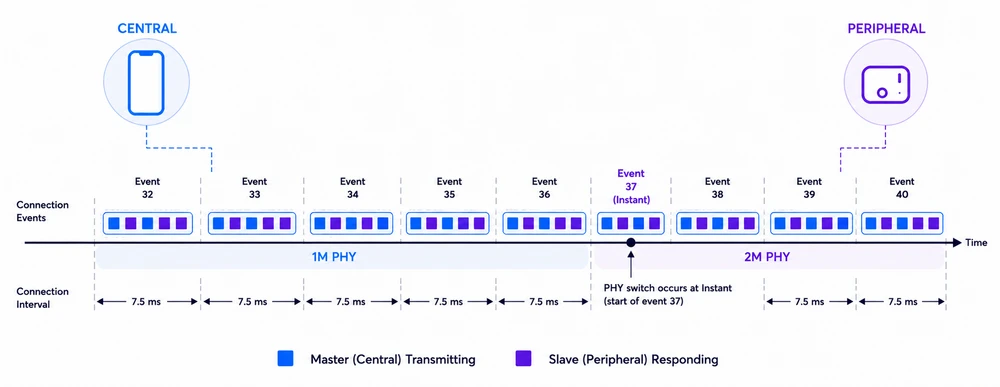
Managing the connection interval is not always easy. The Central device is the one that determines the actual Connection Interval to be used, and it doesn’t always have to be the interval you want.
Even though the Bluetooth specification allows the connection interval to go as low as 7.5ms, devices like iPhones and iPads don’t actually allow that. This means that the actual throughput you’ll achieve can’t be guaranteed.
Android and iOS each determine the Connection Interval according to their own algorithms which aren’t public. There’s some limitations that we know about and some we don’t.
When the Central and Peripheral devices connect, the Peripheral can use the LL_CONNECTION_PARAM_REQ and LL_CONNECTION_PARAM_RSP procedure, or the L2CAP Connection Parameter Update procedure to update the connection interval. This allows the peripheral device to a lower connection interval. However, the Central is free to ignore aggressive intervals.
In fact some Android devices will apply the aggressive interval for some time only to then slow it back down.
There’s several factors on what impacts the actual connection interval. iOS and Android. These devices need to be connected to multiple devices at a time, which may not be possible if the connection interval is very small since the radio can’t meet the timing of sending packets to other devices. Longer intervals give the Bluetooth radio time to service all the connections.
So you’re likely to see the connection interval be longer if there are multiple devices connected at the same time.
You may be wondering – if I can fit as many responses in a Connection Event, why does it matter if it’s short or long? The answer in part is buffering – devices have a limited number of buffers available which limits the number of packets per Connection Event. So making the connection interval longer means that you will only send a certain number of packets per event and the throughput will drop.
Other considerations are power consumption – a Central that is running fast connections will consume more power, sometime Apple and Android vendors want to control
iOS Connection Interval Settings
- 15ms allowed for short duration
- 30ms Sustainable
- 11.25ms for HID ad Input Devices
Android Connection Interval Settings
On the other hand, Android does allow for 7.5ms connection intervals, but will often throttle it if there’s not data being exchanged. This behavior is different among different Android devices because of the different firmware.
Embedded Device Connection Interval
We covered mobile devices, but there’s a good chance you can be working with embedded BLE Central devices. If you control both sides of the system, they it’s much easier to make sure you get the 7.5ms connection interval you want. In fact, getting the highest throughput is easiest when you have a Central you control.
Finally, there’s some great new. Bluetooth 6.2 has introduced the Short Connection Interval (SCI) feature which allows for LE connections to use connection intervals of 375us.
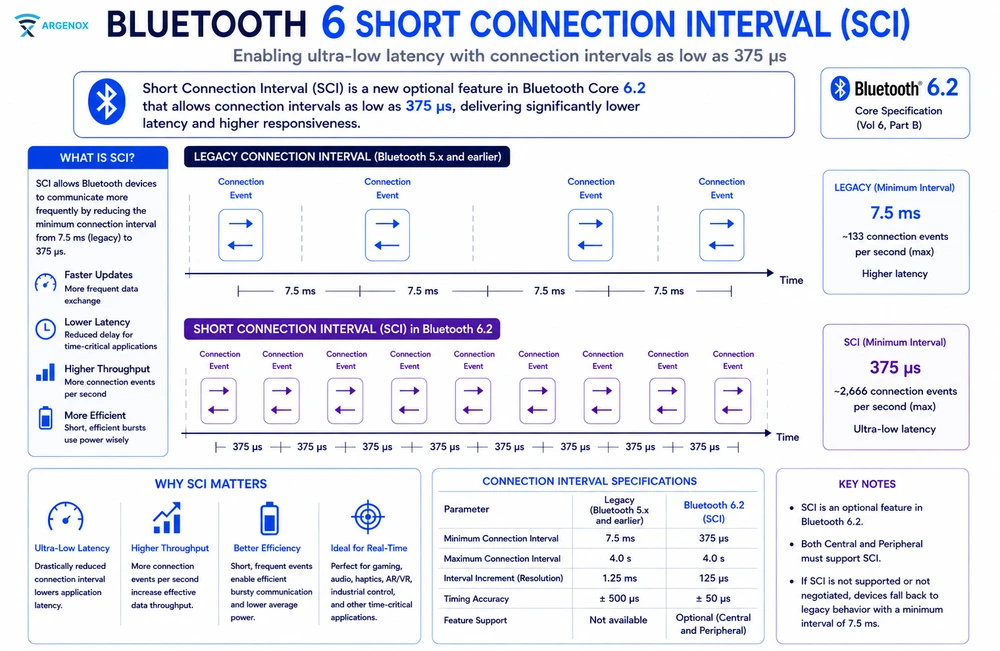
However this won’t necessarily change throughput significantly – we’re still trying to fit as many packets in a connection interval, and making that interval shorter doesn’t change much of the behavior. This change is primarily for latency reasons but can have some benefits in higher throughput.
Packets in Connection Events
We talked about the fact that we have periodic Connection Events where data is exchanged. But the Connection event doesn’t just exchange one packet – a connection event can remain open until before the next Connection Event is set to occur. How long that is depends on the stack and implementation but tends to be 150us or more. This means that as long as either the Central or Peripheral have data to sent, they can and should.
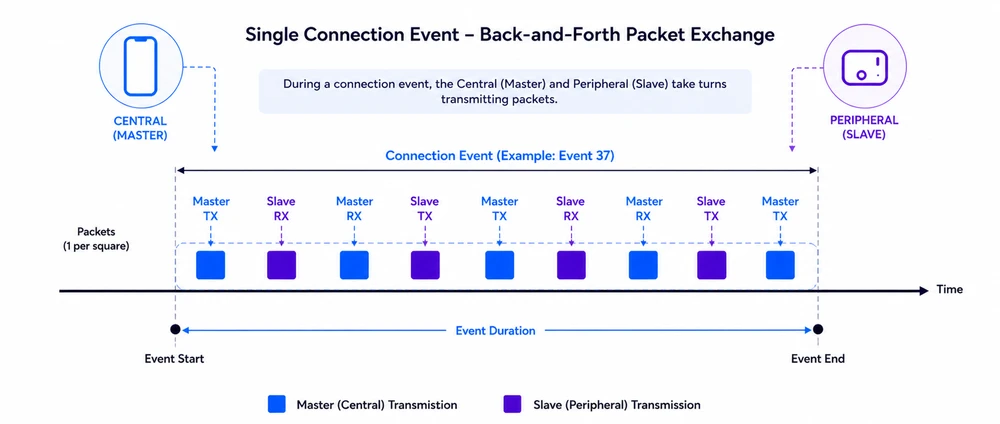
One thing we need to realize here is that this transmission isn’t one way. The Central and the Peripheral exchange packets. As long as one has more data, they’ll be exchanged and the other device will respond with empty packets. Those empty packets still take up airtime which means they reduce the actual throughput. That’s another reason why you can’t get 2Mbps.
If you’re a Peripheral uploading data to a phone, you want to avoid getting responses back from the Central that would add data bytes to that empty response packet. Otherwise you’ll see a drop of throughput in the Peripheral → Central direction. Less packets from the Peripheral will fit in a single Connection Event.
There’s another factor here we need to consider – sending multiple packets in a Connection Event requires that they be buffered, and that there’s enough buffer space for that data. The reason is that the radio has to respond very quickly with the next packet, which most stacks can’t meet unless the data is already in buffers.
This buffering is often configurable in the stacks, which means that not every stack behaves the same. For example, Nordic’s stack typically supports up to 6 packets per Connection Event. Other devices and stacks have different number of buffers, which means they may not always be able to send more packets and will close a Connection Event earlier than they should, lowering throughput.
While a low connection interval is helpful with increasing throughput, the overall goal is to maximize the number of packets that can fit in a single Connection Event. When the buffers are limited, faster Connection Events are better, but with more Connection Events, the interval can in fact be increased. Note that this impacts latency so there’s other factors to consider.
Packet Inter Frame Space
The BLE Specification has traditionally defined the minimum time between packets to be 150us. This is the time that a radio has to do everything it needs to send or receive the next packet, and is referred to as TIFS (t_IFS). This space is a dead time, where the radio can’t transmit (but are likely calibrating or ramping up), which means that we lose throughput.
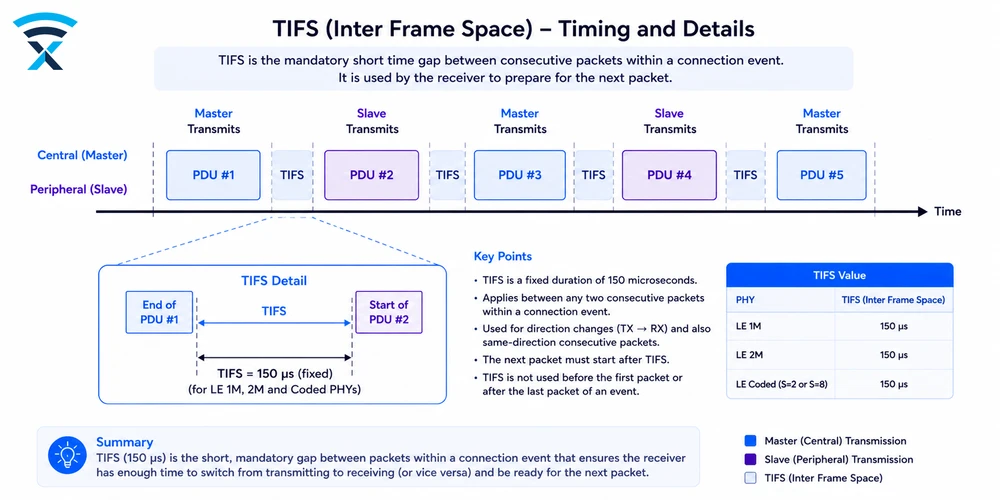
The Bluetooth 6.0 Specification introduced adjustable TIFS which allows the radios to reduce the time to respond. This is typically a hardware change because it requires the radio to change parameters and be fully ramped up and ready to transmit within that time. Many radios have yet to support this change given how relatively new the Bluetooth 6.0 specification is at the time of this writing.
Lower TIFS means more bits in the air which will help throughput, giving the radio the ability to send more bits (and potentially another packet).
Stack and Controller Behavior
We talked a bit about the buffering and behavior and how it affects throughput. There’s a lot that goes into it, and the details are very stack dependent.
One of the challenges in maximizing the throughput is making sure the stack is performing everything it needs to to meet the timing. To achieve this, some of this gets offloaded to Hardware. For example, in Nordic devices the TIFS is managed by a hardware timer, and 150us after being set the radio automatically transmits the data being pointed to.
Processing GATT requests in 150us is often not possible, which means that some operations will necessarily take more time.
L2CAP MTU
Now that we’ve talked about the lower levels of the stack, it’s time to start covering the Host side with L2CAP.
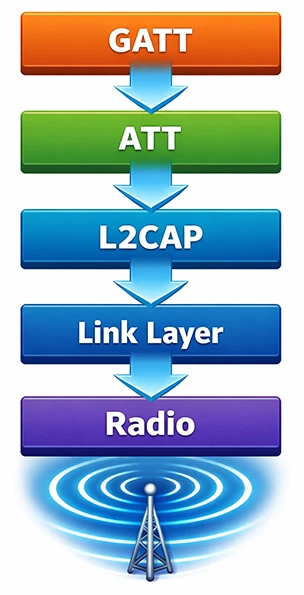
In our guide Understanding BLE GAP, GATT and L2CAP we explained how L2CAP serves to fragment packets into the PDUs (which DLE defines). In most stacks, the size of the L2CAP Maximum Transmission Unit (MTU) is configurable. This is the case for Zephyr, where you will need to configure it to 247 to ensure that it’s as large as possible.
This can also be defined in the prj.conf file of the project:
CONFIG_BT_L2CAP_TX_MTU=247
CONFIG_BT_L2CAP_RX_MTU=247
ATT MTU
The GATT layer communicates using the ATT protocol with the L2CAP layer. These packets also have a size and this parameter is called the ATT Maximum Transmission Unit (ATT MTU).
Since GATT packets may be split into one or more PDUs by the L2CAP layer, to maximize throughput we also want to maximize this size to make sure that the data we’re sending isn’t getting fragmented.
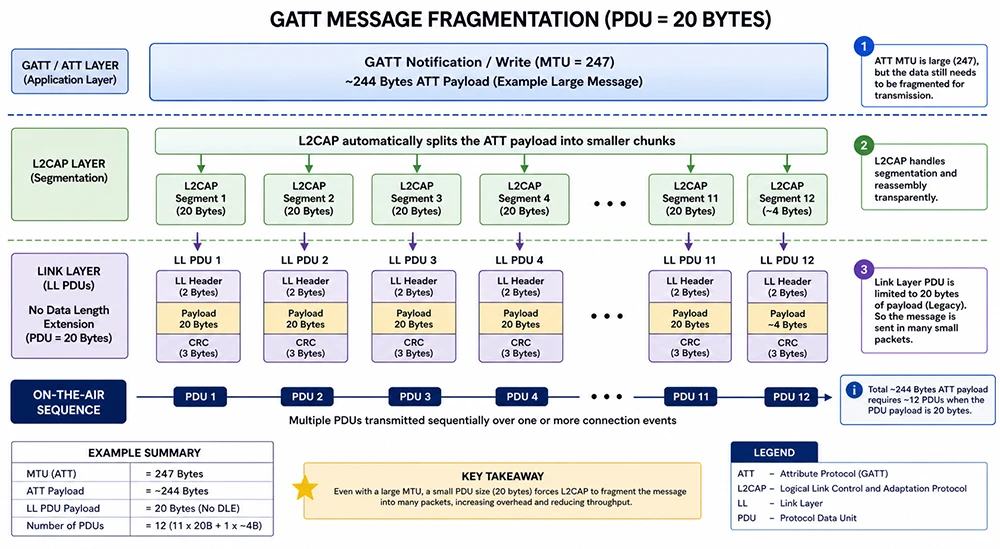
If the ATT Packet size is small, then the DLE won’t matter and the notifications and events will be split up.
To configure this, set the appropriate settings the prj.conf file of Zephyr:
CONFIG_BT_L2CAP_TX_MTU=247
CONFIG_BT_BUF_ACL_RX_SIZE=251
CONFIG_BT_BUF_ACL_TX_SIZE=251
GATT Operation Type
We’ve covered a lot of the low level behavior and how the Bluetooth Radio communicates and the impact. But the kind of data one sends at higher layers also impacts the throughput.
GATT operations like Write with Response and Indications both require application level response from the other side before continuing transmission. This creates a very big delay that doesn’t allow other packets to be sent. Remember that our intention is to reduce the delay to the TIFS.
Because of this, using Notifications (for Peripheral to Central) and Write without Responses (for Central to Peripheral) is the only way to make sure we’re sending data as quickly as possible. On the other hand, Connection Oriented Channels (CoC) also allows sending data without the GATT overhead.
A note about Interference
Bluetooth Low Energy does quite a good job dealing with interference from other devices using adaptive frequency hopping. But it’s not perfect. In our discussion here we won’t include interference because it requires deep simulations and testing to understand the impact.
Interference can have a big impact on throughput. Because it causes bit and packet errors, packets will fail the CRC check. This forces the Bluetooth stack to retransmit packets, which reduces the throughput you get because packet slots get used for retransmission.
What we can expect as far as BLE Throughput
From our discussion above you will quickly realize that that reaching 1 Mbps or 2 Mbps throughput in Bluetooth Low Energy connections isn’t going to happen. Even in an ideal setup using the LE 2M PHY, Data Length Extension, and maximum MTU, the radio spends a significant amount of time handling protocol mechanics instead of payload.
Each transmission includes preamble, access address, headers, and CRC, and those bytes scale poorly compared to payload efficiency. When you add real system constraints—controller scheduling limits, host stack delays, buffer sizes, and OS timing jitter the throughput drops further.
So what can we get? We’re going to update this guide with examples of throughput and even tests of actual devices.
Overall application throughput typically lands around 1.0–1.4 Mbps, even though the PHY advertises 2 Mbps. This isn’t a limitation of your implementation – as we showed through the various factors, it’s a consequence of how BLE is designed to balance reliability, coexistence, and power efficiency.
BLE Connection Oriented Channels (CoC)
One of the little know features in BLE are the Connection Oriented Channels. Although Bluetooth LE was built primarily around GATT, and most operations you’ll see, the GATT protocol adds a certain overhead to packets, which is why instead of 251 you get only 247 bytes.
With Connection Oriented Channels, you can bypass GATT completely and get data bytes. This can help you send a few more data bytes across per packet
Achieving Maximum BLE Throughput
It’s clear from the discussion above that there’s things we can
- Set the Connection interval to the lowest you can which will allow transfers to start faster
- Enable Data Length Extensions (DLE) by default to reduce overhead
- Configure GATT MTU to the largest value possible (often 512)
- Use Notifications and Writes without response, or even Connection Oriented Channels
- Use 2M LE PHY
- Increase the number of buffers and fill them with data as much as possible to maximize the number of packets transferred per Connection Event
Designing High Throughput Protocols
One very important consequence of everything we’ve seen is that we need to be careful in our protocol design. For maximum throughput we need to create a protocol with the following characteristics:
- Buffer as much data as possible without waiting
- Use Notifications and Writes without response, or even Connection Oriented Channels
- Don’t require acknowledgements – waiting for the application means lost transmission slots and extremely low throughput
- Add CRC and verification at a higher level – the BLE radio already adds CRC and retransmissions, so the rate at which CRC is done can be at a higher level which adds low overhead
Higher Data Rate (HDR) – the Future of Bluetooth LE
If there’s something that Bluetooth SIG and all of us want is more speed. Bluetooth Classic is not growing and LE is has been steadily replacing it. But BLE throughput of BLE is still not enough. Bluetooth is approaching a point where simply pushing more packets through the existing ATT/L2CAP pipeline is no longer the most effective way to scale throughput.
Some time ago the Bluetooth SIG announce that BLE High Data Rate (HDR) is coming. From data from various vendors BLE HDR will allow 4Mbps, 6Mbps and even 8Mbps radios to operate, which will finally bring Bluetooth LE up to speed with Bluetooth Classic.
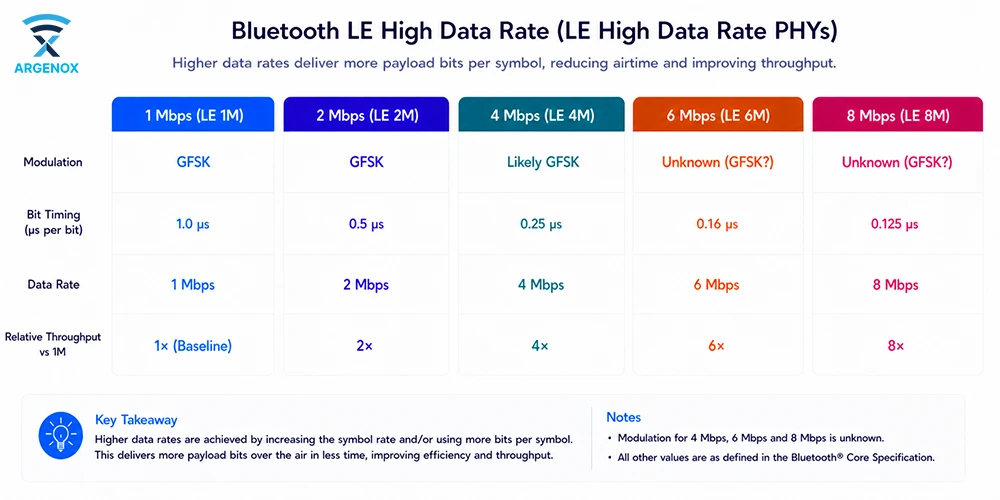
We don’t yet have all the details of what this will consist of, but the features introduced in the latest specifications, especially around isochronous channels, improved controller scheduling, and more predictable Connection Events, do enable devices to move larger volumes of data with fewer retransmissions and less wasted airtime. This is particularly important for applications like audio streaming, firmware updates, and sensor aggregation, where consistency matters more than theoretical maximum Mbps.
Summary
Getting the most out of a BLE Radio means optimizing every layer of the radio, from the PHY to GATT and the application. The exact throughput you will see depends on a variety of factors, many under your control and some that are not.
Interference is another factor that will cause retries and lower throughput, and even connection loss.