If you’ve worked with Bluetooth Low Energy (BLE), you’ve probably seen terms like GAP, GATT, and L2CAP mentioned in code and applications.
At first glance, these acronyms can feel overly technical and abstract. After all, the Bluetooth Specification and Stacks are pretty complicated.
But these three components are just different parts of how BLE devices find each other, connect, and exchange data.
Once you understand them in plain terms, BLE becomes much easier to think about and work with.
In this guide, we’ll break everything down in a simple, intuitive way so you can understand what matters
The Big Picture: How BLE Actually Works
Think of BLE like a conversation between two devices:

- They announce themselves
- They connect
- They exchange structured data
- The data gets split and transported efficiently
Each of these steps maps to a layer in the Bluetooth stack:
| Step | BLE Layer |
|---|---|
| Discover devices | GAP |
| Connect | GAP |
| Define data | GATT |
| Move data | GATT + L2CAP |
GAP: How Devices Find and Connect to Each Other
What BLE GAP Does
The General Access Profile or GAP is a layer that you will interact with directly when building BLE products and applications. Every stack has GAP functions that are responsible for:
- Letting devices advertise their presence using Advertisement packets
- Scan for devices to discover them
- Create and Manage connections
So GAP helps manage everything having to do with creating connections between two BLE devices, which is the first step to get two devices to talk.
BLE Advertising
Before any connection happens, a BLE device sends out small packets called advertisements.
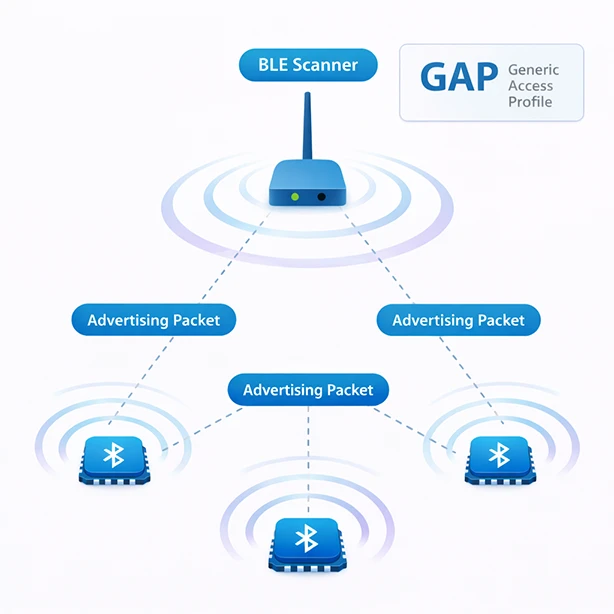
These packets can include:
- Device name
- Supported services
- Manufacturer data
- Flags (connectable or not)
And many other pieces of data (though these are the most common).
Advertisements are very small packets designed to make finding devices easy, but they do have some limitations:
- Max payload: 31 bytes (legacy advertising)
- Sent on 3 dedicated channels (37, 38, 39)
- Broadcast periodically (e.g., every 20 ms to several seconds)
Because of this, designing advertisements is a real engineering tradeoff.
Scanning and Looking for Devices
Another device (like your phone) acts as a BLE Central device and scans for these advertisements from the BLE Peripheral. To do this, the scanner also uses GAP functions to configure and enable the scanning.
Scanning is a configurable operation mainly controlled by the interval and duration. These parameters tell the BLE radio how long to scan for devices on every BLE channel. Depending on these parameters, the Central can quickly and easily sees the Peripheral advertisements.
This is how every BLE device, even phones with apps, find nearby BLE devices.
Roles: Who Does What?
BLE defines two main roles:
- Peripheral Role
- Sends advertisements to be found
- Waits for connections
- Usually low power (sensors, wearables)
- Central Role
- Scans for devices
- Initiates connections
- Usually more powerful (phones, PCs)
Establishing Connections
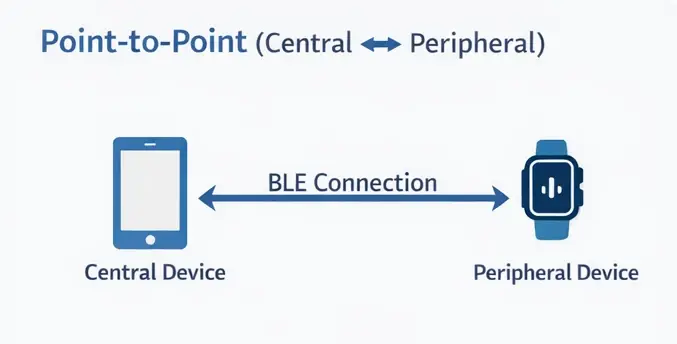
Once a central devices finds a device it wants to connect to, it starts the connection process by using a GAP function to request a connection.
Establishing the connection is a job of the Bluetooth Stack, but there’s usually some configuration parameters for how to establish that connection related to the connection parameters.
One the connection is established, both devices start communicating periodically on connection events that happen at fixed intervals.
Now that both BLE devices have connected, GAP has done its job and it’s now the job of GATT to help with the next steps.
GATT: How Data Is Organized and Accessed
What GATT Does
Once the two BLE devices are connected, the next step is to exchange data. The Generic Attribute Profile or GATT defines what data exists on the device and how you read/write it. GATT is basically a database made up of attributes that define the structure.
If GAP is about finding devices, then GATT is about talking to them.
To talk to this database, we have a GATT Client running on the that will use the Attribute Protocol (ATT) to talk to the GATT Server running on the Peripheral.
This database structure is something you will spend quite a bit of time designing when creating a BLE product because it defines how your device behaves.
GATT: Structured Data
BLE doesn’t just create a pipe to send random data—it organizes it into a hierarchy in a database with a well-defined protocol to discover, access and modify the data.
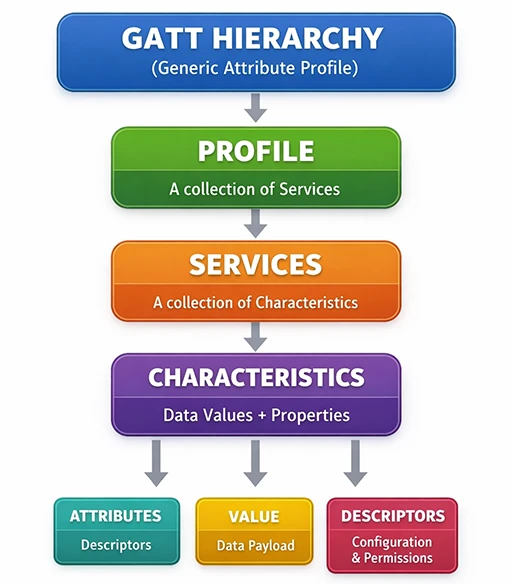
Let’s talk a bit about how GATT structures the Data using Services and Characteristics.
1. Services
A GATT Service groups related data that represents data that a Peripheral can provide. A few examples of common services. A few example services include:
- Heart Rate Service – Provides beats per second and similar information
- Battery Service – Provides information about a battery including Battery %
- Device Information Service – Provides Device information like manufacturer, model number, etc
2. Characteristics
Each service is made up of one or more GATT Characteristics, which define the actual data that will be exchanged
For example, the Heart Rate Service has the Heart Rate Value, while the Battery Service provides Battery Level. We’ll show a few examples in a moment.
3. Descriptors (Optional)
Descriptors are items that contain additional information about the data being exchanged. For example they can provide:
- Units
- Metadata
- Configuration
Simple Example
Below is a practical example of how a typical Bluetooth Low Energy device organizes its data using GATT services and characteristics for a health sensor:
Service: Device Information (0x180A)
   ├── Characteristic: Manufacturer Name (Argenox)
   ├── Characteristic: Model Number (AX-1000)
   ├── Characteristic: Serial Number (SN12345678)
   ├── Characteristic: Hardware Revision (Rev 1.2)
   ├── Characteristic: Firmware Revision (FW 3.4.1)
   ├── Characteristic: Software Revision (SW 2.8.0)
   ├── Characteristic: System ID (0x123456FFFE789ABC)
   ├── Characteristic: Regulatory Certification Data List
   └── Characteristic: PnP ID (Vendor ID: 0x1234, Product ID: 0x5678)

Service: Heart Rate (0x180D)
   ├── Characteristic: Heart Rate Measurement (72 bpm) [Notify]
   ├── Characteristic: Body Sensor Location (Chest)
   └── Characteristic: Heart Rate Control Point (Reset Energy Expended)

Service: Battery Service (0x180F)
   └── Characteristic: Battery Level (85%) [Read, Notify]
The structure above shows you that there are 3 services for this device, the Device Information Service (DIS), Heart Rate (HR) and Battery Service (BIS). Each of these provides a different type f information. The Battery Service reports the battery level, which can be read or you can enable notifications to get alerted immediately when the value changes.
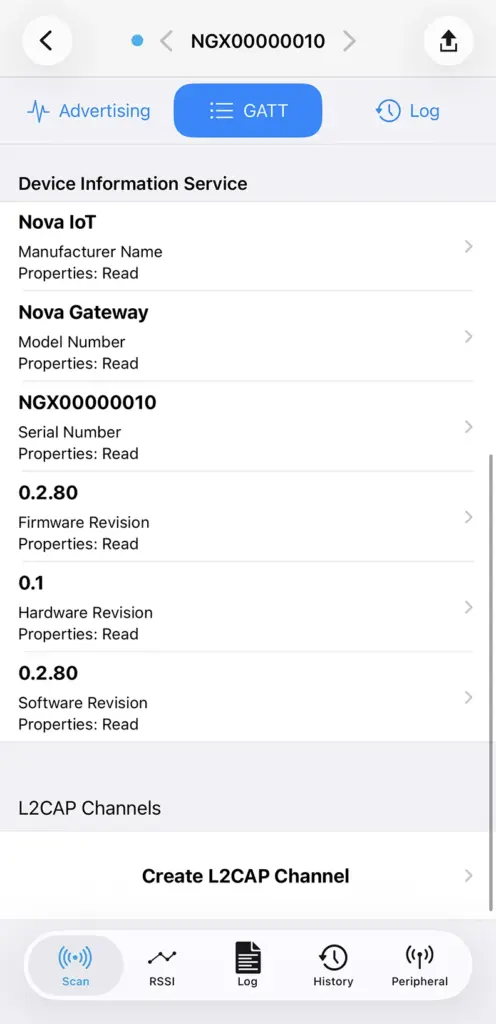
Below you can see the BlueNox BLE Scan iOS App connected to a device with the Device Information Service for a real devices. This is the real GATT database structure of a device. All the information you see here has been exchanged via the ATT protocol and shows the GATT structure.
How Devices Interact with GATT
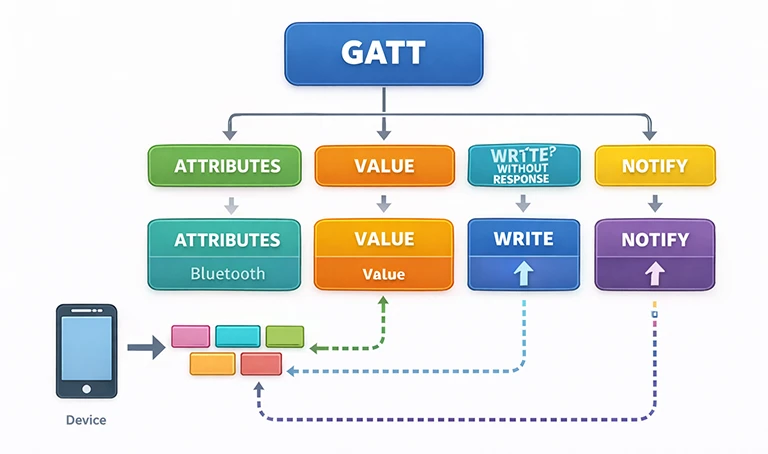
Once connected, a central device can:
- Read the data (e.g., battery level)
- Write the data (e.g., configuration)
- Subscribe to updates (notifications)
Notifications are data updates that can happen at any time when a Peripheral updates the database value.
Now, we said that GATT is structured. And that’s true. However, the data being exchanged in GATT itself isn’t completely specified. You can and typically do create a generic service with Characteristics that send and receive generic data packets. In this way GATT becomes a generic pipe that can send and receive any data. It’s then up to the application to define it.
Why GATT Matters
Bluetooth exists to provide a way to send and receive data. Because of this, you will be spending most of the time you’re working with Bluetooth working with GATT. In a way it defines your entire application interface.
If something is confusing in your BLE system, it’s often because services and characteristics aren’t structured clearly, or notifications and writes are misused. All this plays a role in how fast you can send data.
GATT looks simple but has quite a bit to it and, so we’ll cover GATT in much more detail in another guide.
L2CAP: The Layer You Didn’t Know You Needed
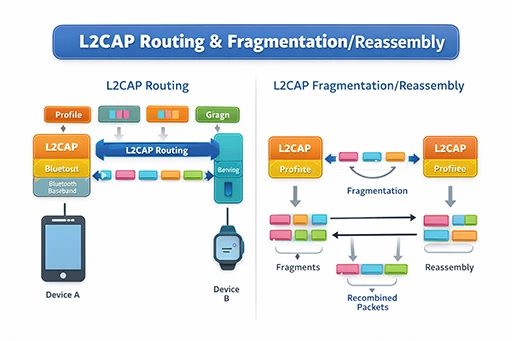
GATT defines the data to be exchanged, but it’s not alone in exchanging the data. GATT doesn’t actually talk to the radio, and it really doesn’t know anything about how the data is sent. To take care of this, deep in the Bluetooth stack there’s a layer called L2CAP which stands for Logical Link Control and Adaptation Protocol. This protocol is the one that helps take the GATT data and send it over the radio.
What L2CAP Does
L2CAP handles how data is packaged, split, and transported. This is because GATT data can’t be sent directly to the radio to be transmitted.
L2CAP is also a router – GATT is not the only component in the system that needs to receive BLE packets. The Security Manager and other components are open, and L2CAP routes the packet where it needs to go. It makes sure that ATT packets (the protocol that is used for GATT communications) is sent to the GATT Service or Client.
There’s a few exceptions but for the most part you don’t usually interact with the L2CAP layer directly—but it affects performance a lot.
The Problem L2CAP Solves
Bluetooth serves to send data, and sometimes that data is large. Even though the original idea for BLE was to send small amounts of data, it was understood by the people working on Bluetooth that the small BLE radio was still limited.
Initially the BLE radio could only send 27 bytes of payload. While this amount could fit a lot (think temperature and humidity) , it was still not enough for a lot of applications. So what happens when you want to send more data?
This is where L2CAP comes in. Aside from routing packets, L2CAP breaks higher layer data into chunks when transmitting and reassembles it when receiving.
Even though you work with GATT, your data actually travels through multiple layers in the Bluetooth Stack:
GATT → ATT → L2CAP → Link Layer → Radio
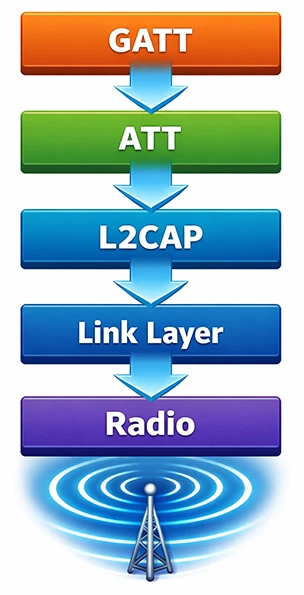
When you’re working with GATT and doing Writes and Notifications, the layers underneath are making sure the data makes it to the other side.
Real-World Example
Let’s say you just updated a characteristic with a value that’s 100 bytes. But the radio was only able to negotiate 27 bytes. BLE can’t send that in one packet, but L2CAP allows it to split it up into smaller packets.
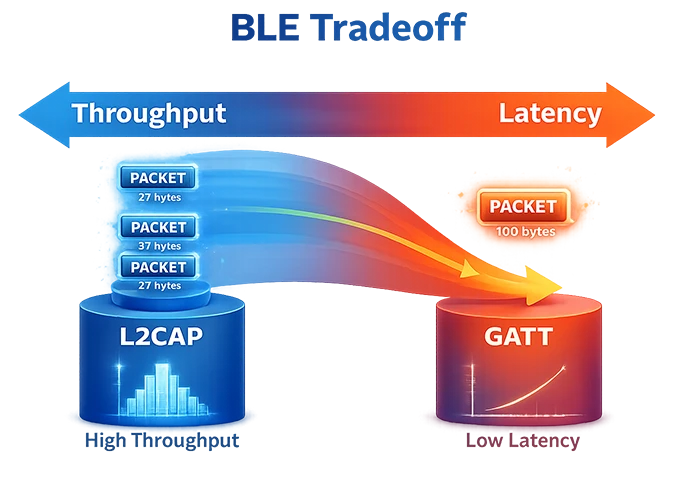
So L2CAP:
- Splits the data into smaller packets
- Sends them one by one across the BLE link
- Reassembles them on the other side
This process is completely transparent to the higher layers. For example GATT has no idea that any data was split. You can see this behavior if you capture the low-level Bluetooth LE packets.
Where Performance Comes In
As you can imagine, this fragmentation and reassembly come with a cost. L2CAP has to add a header to every packet to know where it goes and if it needs to reassemble it. Because of that overhead, the individual packets hold less data. L2CAP directly affects:
- Throughput
- Latency
- Reliability
Some of the issues you can experience are:
- Slow transfers → small packets or poor timing
- Dropped data → fragmentation problems
- Weird behavior → MTU / buffer mismatches
You don’t really control L2CAP but rather the radio configuration underneath.
How GAP, GATT, and L2CAP Work Together
Now that we’ve broken it down, let’s put it all together in a real flow:
Step 1: Initialization
For peripheral devices that have a GATT database, the configuration of the GATT database is done before the device is initialized.
While the database can change after initialization, most of it is configured when the stack is initialized to make sure it’s ready to send and receive.
Let’s look at a concrete example. In Zephyr, the two main patterns for GATT table initialization are:
- Static registration at build time
BT_GATT_SERVICE_DEFINE(name, ...)defines and registers a static GATT service.
- Dynamic/runtime registration
BT_GATT_SERVICE(attrs)wraps an attribute array into abt_gatt_service.bt_gatt_service_register()registers that service at runtime.bt_gatt_service_unregister()removes it later.
The core building blocks you usually use inside the table are:
BT_GATT_PRIMARY_SERVICE(...)BT_GATT_CHARACTERISTIC(...)BT_GATT_CCC(...)- read/write callbacks using
bt_gatt_attr
Step 2: Discovery (GAP)
With the GATT database configured, the Peripheral now needs to advertise its presence with information that helps the Central to find it.
A device advertises “I’m a device with a Sensor Service”.
This is done by the application calling GAP functions to configure the advertising rate and the content of what is advertised. Designing the advertising is something every product developer has to do.
Step 3: Connection (GAP)
On the Central side, a device like a phone wants to connect to the peripheral. To do this it needs to configure and enable the Scanning. It Scans for devices and receives the advertising packets for the device we’re looking for. It then issues the command to start the connection. The radio and the rest of the Bluetooth stack then start the connection.
Step 4: Data Structure (GATT + L2CAP)
Once the two devices are connected, it’s the job of the phone (Central) device to discover the Peripheral’s database structure. In this case it finds the Services and Characteristics of the Sensor.
Even these ATT discovery packets are handled by L2CAP. Using this protocol the Central discovers:
- Temperature service
- Battery service
Step 5: Data Transfer (GATT + L2CAP)
Now that the phone knows what the data is offered by the sensor, it uses ATT commands to read the data.
As the phone requests the temperature data, the Sensor sends it back. GATT communicates using the ATT protocol. If the data is too large to fit in packets, L2CAP fragments it and reassembles it transparently – GATT doesn’t know it’s happening.
Common BLE Mistakes
1. Thinking only GATT Controls Performance
GATT is part of a complex set of layers and although it can have an impact on performance like latency and throughput, It usually doesn’t.
Performance is mostly affected by:
- L2CAP
- MTU size
- Connection interval
2. Ignoring Advertising Design
Bad advertising = devices not found reliably.
3. Overcomplicating GATT
Many designs end up:
- Use too many services
- Causing Data Fragmentation unnecessarily
Avoiding these issues helps maximize the performance
Final Thoughts
BLE can seem complicated—but it becomes much clearer when you break it down the roles of each of the parts:
- GAP – Finds and connects devices
- GATT – Defines the data
- L2CAP – Moves the data and splits it up if needed
If you keep that mental model in mind, most BLE problems become easier to diagnose and fix.