Bluetooth audio on Linux often feels like a maze: you install BlueZ, your headset “pairs,” something connects, and then… audio either works perfectly or fails in ways that seem unrelated to what you touched.
The reason is that “Bluetooth audio” on Linux is not a single subsystem—it’s an integration story across multiple layers

- The Bluetooth stack (BlueZ) is a Host stack and handles devices, connections, profiles, codecs negotiation, and data transport.
- The kernel provides Bluetooth HCI and the data channels (SCO/eSCO, ACL, ISO, etc.) and sometimes exposes PCM-like interfaces.
- The audio stack (ALSA, plus usually PulseAudio or PipeWire) routes audio streams, handles mixing, resampling, policy, and often hosts codec implementations and profile logic.
- Applications either talk to ALSA directly (rare for Bluetooth headsets now) or talk to a user-space audio server (common), which then decides how to use BlueZ.
This article explains how BlueZ integrates with ALSA and audio in real systems, how data flows from an app to your earbuds (and back for microphones), and how to debug the most common failures.
The Linux Bluetooth Stack in One Picture
At a high level:
- Your machine has a Bluetooth controller – typically USB dongle, PCIe module, or SoC radio
- The Linux kernel exposes that controller via the HCI subsystem:
hci0. - BlueZ (primarily
bluetoothd) manages:- discovery / pairing / security
- profile selection (A2DP, HFP, etc.)
- media endpoint registration and codec negotiation (often with help from PulseAudio/PipeWire)
- creation of “transports” that represent audio streams

Historically, Linux desktop audio for Bluetooth has been:
- BlueZ + PulseAudio – this is older older but still common)
- BlueZ + PipeWire (modern default on many distros)
- In embedded devices there’s sometimes BlueZ + custom audio routing and a minimal ALSA pipeline
It’s important to understand that BlueZ is not an ALSA plugin for Bluetooth audio in modern setups. BlueZ exposes Bluetooth audio endpoints and data transports.
PulseAudio/PipeWire typically become the “bridge” between Bluetooth and ALSA devices (speakers, headphones, microphones), as well as the place where mixing, routing, and policy live.
ALSA’s Role: Hardware Interface, PCM Streams, and “Where Audio Lives”
ALSA (Advanced Linux Sound Architecture) has two main aspects:
- Kernel drivers for audio hardware: sound cards, I2S codecs, HDMI audio, etc.
- User-space ALSA library (
libasound) that apps can use to open PCM devices likehw:0,0ordefault.
ALSA is excellent at opening a PCM stream to audio hardware device and playing samples. However, Bluetooth audio is not inherently an ALSA hardware device since Bluetooth requires:
- Profile negotiation (A2DP vs HFP)
- Codec negotiation (SBC/AAC/aptX/LDAC/LC3…)
- Packetization and timing
- Buffering and latency management
- Microphone + Speaker “telephony mode” switching
That’s why Linux (especially Linux in Desktop systems) typically uses a dedicated audio server (PulseAudio/PipeWire) to sit in the middle.
So, while ALSA is usually the interface to your local physical audio devices, BlueZ handles remote Bluetooth devices, and an audio server bridges them.
BlueZ Audio Integration
BlueZ + PulseAudio/PipeWire (Most Common)
This approach is very common for high end devices
Data path (playback):
App → (PulseAudio/PipeWire) → codec encode → BlueZ transport → Bluetooth controller → Headset
Data path (capture/mic):
Headset → Bluetooth controller → BlueZ transport → decode → (PulseAudio/PipeWire) → App
In this pattern, ALSA is usually used by PulseAudio/PipeWire to talk to the physical sound card, but for Bluetooth headsets the “output device” is virtual and managed in user-space.
BlueZ + custom audio pipeline (Embedded/Appliance)
You might run BlueZ but not run PulseAudio or PipeWire. Then you build your own bridging logic, typically:
- Use BlueZ D-Bus to manage connection and profile
- Use BlueZ’s media transport FD(s) to read/write audio packets
- Implement codecs (SBC, LC3, etc.) and timing yourself or via libraries
- Output/input raw PCM via ALSA to local hardware
This is much more work, but it’s common in embedded products where you want control, small footprint, or deterministic behavior.
4) A Quick Map of Bluetooth Audio Profiles and Their Transports
A2DP (Advanced Audio Distribution Profile)
- For high-quality stereo music playback
- Typically uses ACL channels (packet-based data), not SCO
- Codecs: mandatory SBC, optional AAC, aptX, LDAC, etc.
HSP/HFP (Headset Profile / Hands-Free Profile)
- For voice calls (two-way audio)
- Traditionally uses SCO/eSCO (synchronous voice channels)
- Codecs: CVSD (narrowband), mSBC (wideband). Newer systems may support LC3 via HFP “super wideband” in some implementations, but historically mSBC is the “nice” one.
LE Audio (Audio over BLE, “BAP” and friends)
- Uses ISO channels (Bluetooth 5.2+ feature)
- Codecs: LC3
- Architecture is different: unicast and broadcast audio, audio “streams” (ASEs), etc.
BlueZ support for LE Audio has been evolving, but the integration story still often involves PipeWire/PulseAudio-like components depending on distro and version.
5) What BlueZ Actually Exposes for Audio
BlueZ is a user-space daemon and set of libraries/tools. For audio, BlueZ exposes:
- D-Bus interfaces like
org.bluez.Media1,org.bluez.MediaTransport1, and device/profile interfaces. - Media endpoints concept: endpoints represent codec capabilities and how to set up a stream.
- Transport objects: represent an active audio stream (selected codec, MTU, state, delay, etc.).
- A mechanism to get an FD for the audio stream (depending on profile and the specific integration).
In “classic” BlueZ audio designs:
- A2DP streams are typically moved via RTP-like payloads over L2CAP channels.
- HFP audio via SCO may involve kernel SCO sockets.
But in practice, most Linux systems do not have apps directly reading/writing those sockets; the audio server does.
6) Why ALSA “Bluetooth PCM Devices” Are Not Usually the Main Story
You may have heard of:
bluealsa(a project that provides ALSA PCM devices for Bluetooth audio)- older “ALSA bluetooth plugin” approaches
These exist and can be great for embedded/headless setups. But on many mainstream desktops, the dominant approach is PulseAudio/PipeWire, not a pure ALSA-level Bluetooth plugin.
bluealsa is worth mentioning because it is literally a “BlueZ to ALSA” bridge. It creates ALSA PCM devices corresponding to Bluetooth devices/profiles so that ALSA apps can open them as if they were sound cards. That can be extremely useful if:
- you don’t want PulseAudio/PipeWire
- you want to route with ALSA-only tools
- you’re building a minimal embedded system
But if your environment already uses PipeWire, you generally don’t need bluealsa.
7) PipeWire vs PulseAudio: Where the Integration Logic Lives
PulseAudio
PulseAudio introduced a Bluetooth module that talks to BlueZ over D-Bus and manages:
- A2DP sink/source and HFP/HSP source/sink devices
- switching profiles
- running or leveraging codec implementations
- exposing Bluetooth devices as Pulse “sinks” and “sources”
PipeWire (with WirePlumber)
PipeWire aims to be a low-latency multimedia graph, and WirePlumber provides session/policy management. PipeWire has strong Bluetooth integration and has become the modern standard on many distros because:
- better pro audio and low-latency story
- robust routing graph
- improved Bluetooth codec and profile handling (depending on version and distro patches)
In both cases:
- BlueZ is responsible for the Bluetooth side (connections, transports)
- the audio server is responsible for audio routing, mixing, and user policy
- ALSA is commonly used underneath for local sound devices
8) The End-to-End Playback Flow for A2DP
Let’s walk a typical A2DP playback scenario:
- Pairing and Trust
bluetoothdhandles pairing and stores keys.- The device becomes known; the audio server sees it as a possible endpoint.
- Endpoint Registration
- PipeWire/PulseAudio registers “media endpoints” with BlueZ, describing supported codecs and capabilities (SBC mandatory; optional others).
- BlueZ now knows the system can handle certain codecs.
- Profile Connection
- When you connect your headset for audio, BlueZ sets up the A2DP profile and negotiates the codec.
- The chosen codec must be supported by both the headset and the system endpoint.
- Transport Activation
- BlueZ creates a
MediaTransport1object representing the active stream. - The audio server calls methods to acquire the transport and gets an FD (or uses another mechanism) to send encoded frames.
- BlueZ creates a
- Audio Pipeline
- Application sends PCM audio to Pulse/PipeWire.
- The server resamples/mixes.
- It encodes the stream to SBC/AAC/aptX/LDAC depending on negotiation.
- It packetizes it into Bluetooth transport frames and writes to the BlueZ transport.
- Timing and Latency
- Buffering is crucial. A2DP is not “real-time telephony”; it can tolerate more buffering.
- BlueZ transport exposes delay and other parameters; the audio server uses them to present correct latency to apps.
ALSA is not necessarily involved in sending audio to the headset—the audio server is. ALSA may only be involved if the app is ALSA-native and the system’s “default” ALSA device is routed to Pulse/PipeWire.
Microphone and Bidirectional Audio: HFP/HSP
If you select “Headset Head Unit (HSP/HFP)” mode, your audio quality typically drops compared to A2DP. That’s not (only) Linux’s fault: HFP is designed for voice calls, historically narrowband or wideband speech.
Flow:
- Your headset is connected, and the system may default to A2DP for playback.
- When an app requests microphone input (or you start a call), the system often switches to HFP/HSP to enable the mic path.
- BlueZ sets up the SCO/eSCO transport and the telephony stack requirements (AT commands, call state, etc.).
- The audio server now routes both playback and capture through the HFP pipeline.
Potential Issues:
- Telephony profiles involve signaling (HFP AT command negotiation) and audio (SCO).
- Some headsets behave differently or have quirks.
- Wideband speech (mSBC) requires correct negotiation and an “air interface” that supports it; if it falls back to CVSD, quality suffers.
ALSA’s involvement:
SCO audio may be exposed via kernel interfaces (SCO sockets). But in typical desktop flows, PipeWire/PulseAudio still handles the SCO stream in user-space and exposes it as an audio source/sink.
Audio Codecs: BlueZ vs Audio Server vs External Libraries
A common misconception is “BlueZ does the codec.” In many deployments:
- BlueZ coordinates endpoints and negotiation but does not implement all codecs.
- The audio server (PulseAudio/PipeWire) often provides codec implementations (SBC at minimum, plus optional ones).
- Some codecs may be provided by separate libraries:
libsbcfor SBClibldacfor LDAC (depending on licensing and distro packaging)- AAC via platform libraries (varies)
- LC3 via specific libraries (licensing/patents may affect availability depending on distro)
If a codec isn’t available, you’ll see fallback behavior:
- headset supports AAC but system doesn’t → fallback to SBC
- headset supports aptX but system doesn’t → fallback to SBC
This is why two Linux installs can behave differently with the same headphones.
ALSA Defaults
Many applications on Linux can output audio via:
- ALSA directly
- PulseAudio
- PipeWire (often via PulseAudio compatibility)
- JACK (pro audio)
Even if the app is using ALSA, your system may configure ALSA’s default PCM to route to PulseAudio/PipeWire using plugins like:
alsa-plugins(Pulse plugin)- PipeWire’s ALSA plugin /
pipewire-alsa
So the app thinks it’s opening ALSA default, but audio ends up in PipeWire, which then sends it to Bluetooth.
This is the quiet glue that makes “Bluetooth audio just work” for most apps.
Direct BlueZ-to-ALSA Bridging (bluealsa) for Embedded/Headless
If you want Bluetooth audio on a minimal Linux build without PipeWire/PulseAudio, bluealsa is a classic solution:
- BlueALSA uses BlueZ D-Bus and audio transport FDs.
- It exposes ALSA PCM devices:
bluealsa:DEV=XX:XX:...for playback/capture
- You can then use ALSA tools like
aplayandarecord, or route audio via.asoundrc.
This approach is great for:
- appliances (smart speakers, intercoms)
- automotive head units (if you’re doing something custom)
- embedded products where you want predictable behavior and fewer dependencies
There are however some tradeoffs:
- You still need codec support in user-space.
- You may need to implement policy decisions yourself (auto-connect, profile switching, etc.).
- Desktop features (mixing multiple streams, per-app routing) are more work.
D-Bus Concepts You Should Recognize When Debugging
When debugging BlueZ audio integration, you’ll often interact with these D-Bus objects:
- Adapter:
/org/bluez/hci0 - Device:
/org/bluez/hci0/dev_XX_XX_XX_XX_XX_XX - Media:
org.bluez.Media1on the adapter - MediaTransport: objects that appear when streams are active
Key states/ideas:
- “Connected” does not always mean “Audio streaming.”
- A2DP and HFP profiles can both be connected; the system chooses which is active for audio.
- Media transports have state transitions (idle → pending → active, etc.).
Tools:
bluetoothctlfor pairing/connectingbusctlordbus-monitorfor watching D-Bus interactionsjournalctl -u bluetoothfor daemon logs
14) Common Failure Modes and How to Diagnose Them
Failure: Headset connects, but no audio device appears
Likely causes:
- PipeWire/PulseAudio Bluetooth modules not installed or not running
- BlueZ is running, but no audio server integration layer is present
- D-Bus permissions or service conflicts
What to check:
- Is PipeWire or PulseAudio running?
- Are Bluetooth audio packages/modules installed?
- Logs:
journalctl --user -u pipewire/journalctl --user -u wireplumberandjournalctl -u bluetooth
Failure: Audio works but only SBC, not AAC/aptX/LDAC
Likely causes:
- codec libraries not installed
- distro build doesn’t enable certain codecs for licensing reasons
- headset capability mismatch
What to check:
- PipeWire codec support (varies by build)
- negotiation logs (PipeWire/WirePlumber can show chosen codec)
Failure: Mic doesn’t work
Likely causes:
- system stuck in A2DP (playback-only) and not switching to HFP/HSP
- HFP backend missing (some systems use
oFonohistorically; modern PipeWire has alternatives) - headset quirks or permission issues
What to check:
- Does profile switch happen when mic requested?
- Are HFP components present and enabled?
Failure: Audio stutters or drops
Likely causes:
- RF interference or weak link
- CPU load causing encode starvation
- aggressive power management
- latency/buffering misconfiguration
What to check:
- controller logs, packet errors
- try forcing SBC with lower bitpool
- test with different USB port or disable USB autosuspend for the adapter
Understanding Timing, Latency, and Why Bluetooth Audio Can “Feel Weird”
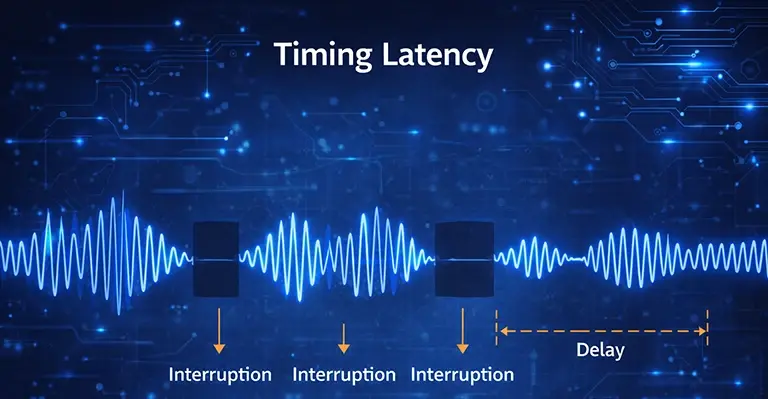
Bluetooth audio introduces buffering at multiple points:
- app buffer
- audio server buffer
- codec frame buffering
- BlueZ transport buffering
- controller scheduling
- headset jitter buffer
For A2DP, higher buffer is acceptable, but it increases latency (lip sync issues).
For HFP, buffers must be smaller, and scheduling must be consistent, or voice breaks up.
PipeWire and PulseAudio both have tunables, but debugging latency requires knowing where the buffer is growing.
If your use case is:
- music playback: prioritize stable playback
- interactive audio (games, instruments): Bluetooth may never be ideal unless the stack supports low-latency modes and the headset is designed for it
LE Audio: Where BlueZ, ALSA, and the Audio Server Are Heading
LE Audio changes the transport (ISO) and codec baseline (LC3). It also introduces concepts like:
- unicast streams (similar to A2DP-like usage but different)
- broadcast audio (Auracast)
- multiple synchronized endpoints
In practical Linux terms:
- BlueZ handles the BLE + ISO transport details
- user-space still must do policy and audio routing
- ALSA’s role remains “talk to local sound cards,” while Bluetooth endpoints appear as logical devices in the audio server
If you’re building a product, pay attention to:
- kernel version and controller support (ISO features)
- BlueZ version
- PipeWire/WirePlumber support level
- LC3 library availability and licensing constraints
Practical BlueZ Audio Integration
Desktop Linux (PipeWire + BlueZ)
Goal: “Bluetooth headset appears in sound settings, supports A2DP and HFP, per-app routing.”
- Ensure BlueZ is installed and
bluetoothdis running. - Use PipeWire + WirePlumber (or distro equivalent).
- Confirm PipeWire’s Bluetooth support is enabled.
- Verify codec packages for your desired codecs.
- Pair using GUI or
bluetoothctl.
This is a typical approach.
Minimal Embedded A2DP Sink with ALSA Output
Goal: “Device acts like a Bluetooth speaker; incoming Bluetooth audio plays out local speakers via ALSA.”
- Run BlueZ.
- Implement or use an A2DP sink component (bluealsa or custom).
- Decode SBC (and other codecs if supported).
- Output PCM to ALSA
hwdevice (I2S codec). - Add reconnect/pairing UX logic.
Headless Bluetooth Playback to Headset with ALSA Tools
Goal: “Connect to headset and play audio from a CLI app using ALSA only.”
- Run BlueZ.
- Run bluealsa and configure ALSA PCM.
- Use
aplay -D bluealsa:... file.wav. - Handle profile selection explicitly (A2DP vs HFP).
Debugging BlueZ Audio Checklist – Peeling the Layers
When Bluetooth audio fails, the first step is almost always to try and identify which layer is failing. This can be done by checking the status of each component in the chain to find where this is probably is
- Hardware/Kernel
hciconfig -a(orbluetoothctl show)- Does the adapter exist? Is it Up?
- BlueZ
- Can you scan, pair, connect?
- Use the
journalctl -u bluetoothto find out the state
- Profile
- Is A2DP connected? Is HFP connected?
- Do you see endpoints/transports on D-Bus?
- Audio Server
- Does PipeWire/PulseAudio see the device?
- Is it set as default sink/source?
- Codec
- Which codec was negotiated?
- Are the required codec libraries installed?
- Routing
- Is the app outputting to the right sink?
- Is the mic source selected correctly?
If you approach it layer-by-layer, “random” Bluetooth audio issues that seem hard to detect suddenly become diagnosable.
Debugging Latency and other Intermittent Linux Bluetooth Audio Issues
Bluetooth audio dropouts and “mushy” latency are almost always buffering + scheduling problems somewhere along the chain:
App → Audio server (PipeWire/PulseAudio) → Codec encode/decode → BlueZ transport → Kernel/HCI → Controller/air link → Headset
The trick is to figure out which layer is starving, which layer is buffering, and whether the problem is RF/link quality or host scheduling/CPU.
What “Intermittent” Usually Means
Intermittent glitches typically fall into one of these buckets:
- Under-run / starvation
The encoder or transport doesn’t get data in time → silence gap or repeated frames. - Over-buffering / growing latency
Buffers accumulate (often to “avoid dropouts”) → audio gets progressively delayed. - RF/link instability
Retries + packet loss force buffering or PLC (packet loss concealment) → clicks/stutters. - Mode/profile switches
A2DP ↔ HFP transitions, codec renegotiation, or device roaming causes brief cutouts. - Power management / bus issues
USB auto suspend, CPU frequency scaling, Wi-Fi/BT coexistence, or BT dongle quirks.
- Confirm stack: PipeWire vs PulseAudio vs BlueALSA
- Reproduce with headset close to adapter
- Check logs: bluetooth + kernel + audio server
- Try different USB port / disable autosuspend
- Force SBC (A2DP) and retest
- Test with Wi-Fi off / move Wi-Fi to 5 GHz
- Check for profile switches when mic is requested
- If still failing, swap dongle/controller to isolate hardware/firmware
Designing a Robust Product: Recommendations
If you’re integrating Bluetooth audio into an embedded product, you need to treat it as a system feature, not just “enable BlueZ.”
From practical experience, we recommend:
- Use a modern kernel + BlueZ for better controller compatibility and fewer quirks.
- Decide early whether you want:
- PipeWire – more capable, more complex
- BlueALSA/Custom – smaller footprint but more engineering effort
- Implement good reconnection and profile policy:
- When to auto-connect
- When to switch from A2DP to HFP
- How to handle multiple devices
- Add observability:
- log codec choice, sampling rate, buffer levels
- export metrics if you can
- Test with a variety of headsets (Apple, Sony, Bose, Jabra, cheap generic)
- Bluetooth audio interoperability is real-world messy
Wrapping Linux Audio
Bluetooth audio on Linux is not a single subsystem but a layered integration of hardware, kernel interfaces, user-space services, and audio frameworks working together.
At the lowest level, a Bluetooth controller—whether a USB dongle, PCIe module, or SoC radio—handles the radio and link-layer responsibilities. The Linux kernel exposes this controller through the HCI subsystem, providing a clean boundary between hardware and software.
On top of this boundary, BlueZ acts as the Bluetooth host stack. It is responsible for device discovery, pairing, security, profile selection (such as A2DP and HFP), and the creation of audio “transports” that represent active Bluetooth audio streams.
BlueZ does not process audio samples itself; instead, it coordinates connections and exposes stream endpoints to user space.
Actual audio handling—mixing, resampling, buffering, policy, and often codec execution—is performed by the audio server, typically PipeWire or PulseAudio, with ALSA providing the interface to local audio hardware.
Together, these components form the end-to-end audio path from applications to Bluetooth headsets, speakers, and microphones.
Latency, dropouts, and intermittent audio issues usually arise from buffering, scheduling, RF conditions, or power-management interactions across these layers rather than from a single faulty component.
Effective debugging requires identifying where audio is being delayed or starved, distinguishing host-side issues from link-layer problems, and understanding how profile selection, codec choice, and power management influence timing.
As Bluetooth audio evolves—especially with LE Audio and ISO-based transports—the roles of BlueZ, ALSA, and modern audio servers continue to shift toward tighter integration, improved synchronization, and more flexible routing.
A clear mental model of these layers and their responsibilities is essential for building reliable Linux systems, diagnosing audio problems efficiently, and preparing for the next generation of Bluetooth audio on Linux.